
Tropicanza Casino on a handset — your slot reels, sportsbook markets, cashier flows, plus the support widget, all reachable through Safari or Chrome without touching a download.
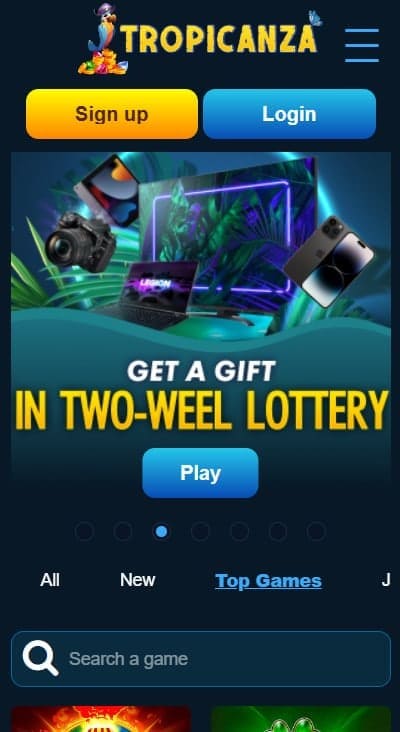
Handset access at this brand splits across two distinct delivery paths. iPhone users reach the lobby exclusively through Safari (or any other modern browser) because Apple's marketplace blocks real-money casino installations across the UK region. Android users can either take the same browser route or install a dedicated APK file distributed via the venue's own website — a sideload requiring users to permit installs outside the marketplace inside device settings. We tested the lobby across an iPhone 15, a recent Pixel running stock Android, plus an older Samsung Galaxy A-series device; the gameplay layer renders identically across all three, with the distinguishing variation sitting around how the wrapper behaves rather than around what reaches the screen.
Coverage below tracks the practical workflow: opening the lobby cleanly, deciding between the browser and the native APK route, adding a desktop-style icon for quick access, what shifts versus desktop play, performance under weaker mobile signal, security caveats around the sideloaded installation, plus the cashier and verification flow on a small screen. Every observation reflects browser-based testing across UK-region handsets connected through standard carrier networks.
| Access Path | How It Works | Best Suited For |
|---|---|---|
| 🌐 Mobile Browser Session | Open Safari, Chrome, Firefox, or Edge and navigate directly to tropicanza.com — no installation required | Casual players, infrequent visitors, anyone preferring to avoid storage commitments on the device |
| 🏠 Home-Screen Shortcut | Add a bookmark via the share menu — launches the lobby in a dedicated tab with a single tap | Regular players who want fast access without committing to the full sideload route |
| 📲 Android Native APK | Download the installation package via the operator's own website — enable "install from unknown sources" inside Android settings first | Android-only audience comfortable evaluating sideload security · iOS users cannot follow this path at all |
Worth flagging up front: the third option carries security trade-offs that the browser approach avoids entirely. We will cover those in detail further down because they matter. For most readers the second route — a home-screen icon launched through Safari or Chrome — delivers everything practical without any of the sideload exposure.
This delivers near-app behaviour without invoking any installation step. Opening the icon takes you straight into the lobby with one tap. Safari handles session-cookie persistence, KYC document uploads via the device camera, plus streamed-room audio routing without anything extra needed. The browser address bar remains visible at the top, which is the main visual difference compared with a true standalone application window.
Where your browser detects PWA-compatible markers, the "Add to Home screen" choice may shift to "Install" instead. Selecting that option packages the experience through Android's WebAPK framework, producing something closer to a true application — a dedicated task-switcher entry, separate storage allocation, plus a standalone window that hides the browser interface. Compared with the sideloaded binary, this approach skips the "unknown sources" permission toggle entirely because nothing installs outside Chrome's own sandbox.
Tropicanza distributes a dedicated Android binary directly through its own website rather than via Google Play. Apple's store restricts real-money gambling installations across the UK region, which forces every offshore brand offering native Android delivery into a sideload route. We want to flag the practical implications because they matter for any reader considering this path.
| Consideration | Browser Route | Native APK Sideload |
|---|---|---|
| Permission Toggle | None required — Safari and Chrome run inside their normal sandbox | "Install from unknown sources" must be enabled at the OS level |
| Update Path | Always current — the responsive site refreshes on every visit | Manual reinstallation each time the operator pushes a new build |
| Storage Footprint | Minimal — only browser-cached assets | Full application binary occupying device storage |
| Notification Support | Browser-based — push notifications limited or absent | Native push channel available for promotional updates |
| Security Surface | Standard browser security model · no elevated permissions granted | Sideloaded binaries carry higher exposure regardless of distribution source |
| Install Reward | Standard registration bonus path only | Free-spin allocation referenced as an installation incentive across operator pages |
Our recommendation is straightforward. Where you want app-like behaviour on Android, the PWA install or browser shortcut path delivers identical gameplay without enabling sideload permissions on your handset. Readers who feel comfortable evaluating APK signatures, verifying file integrity against operator publications, plus configuring per-app permissions can make their own informed call. For everyone else: take the browser route and add a shortcut to your home screen. The free-spin reward attached to the native installation may look attractive, but the cashout ceiling on that allocation sits at €5 — the same cap that applies across the no-deposit layer — so the practical uplift is modest.
One feature worth specifically calling out because it differs from typical offshore-market practice: Tropicanza operates a Telegram bot integration alongside the standard website and APK delivery paths. Linking a personal Telegram profile to the casino account opens a secondary notification and reward channel — additional free-spin allocations, campaign announcements, plus support contact all route through the same messaging app many British users already keep open across their phone session.
Practical considerations before connecting: the bot is a third-party integration sitting outside the casino's own infrastructure, which means messaging-side privacy norms apply alongside whatever the operator publishes. Treat any sensitive account details — passwords, recovery codes, full payment-method numbers — as off-limits inside the chat regardless of how legitimate the bot conversation appears. Stick to promotional information and notification exchanges; route anything authentication-related back through the website cashier directly.
| Feature Area | Desktop Behaviour | Mobile Behaviour |
|---|---|---|
| Lobby Navigation | Persistent sidebar listing every game category plus filter controls | Collapsed hamburger menu opens the same hierarchy on tap |
| Live Stream Layout | Side-by-side dealer feed and betting controls inside a single horizontal viewport | Vertical stack in portrait orientation · landscape mode restores the desktop-style split |
| Slot Reel Sizing | Full-window rendering at native resolution | Reels scale to the viewport · spin button often anchored at the bottom edge for thumb reach |
| Cashier Forms | Multi-column layout for deposit-amount entry plus method selection | Single-column stack · on-screen keyboard occasionally overlaps the confirmation button |
| Chat Widget Position | Floating bubble fixed to the lower-right corner of the viewport | Same widget · slightly smaller footprint to reduce overlap with game controls |
Cold-loading the lobby on a 4G LTE connection consistently completed inside three to four seconds across the devices we tested. Streamed rooms demanded more headroom — smooth rendering held above roughly 5 Mbps downlink, with occasional buffering interruptions across weaker mobile-signal patches. Wi-Fi sessions handled everything without complaint, including extended live-dealer runs at full HD quality.
Battery drain runs at the level typical for an extended browser session containing live video — figure roughly 12% to 18% per hour of active streamed play on a recent iPhone or flagship Android device. Older handsets burn through power faster. Closing background apps and dimming the display extends your effective session window if you plan to play across longer stretches.
Pure slot play sits light on bandwidth — roughly 50 to 100 MB per hour, well inside most monthly mobile allowances. Streamed-room sessions change the picture meaningfully: figure 500 MB to 1 GB per hour at standard HD resolution. Readers on capped data plans should monitor consumption or restrict live tables to Wi-Fi windows where possible.
Audio mixing through Bluetooth headphones works reliably across both platforms during streamed play, though we observed occasional latency drift on game-show formats where the dealer voiceover sits centre-stage. Switching to wired earbuds eliminates that variance entirely if you find the lag bothersome.
Password recovery runs through an email-based reset link. Tapping "Forgot password" triggers a message sent to the address on file. We strongly recommend storing credentials inside a reputable manager (Bitwarden, 1Password, iCloud Keychain, or equivalent) rather than relying on memory or browser autocomplete — gambling-account login data is a high-value target for phishing campaigns.
One handset-friendly registration pattern documented across the brand: profile creation routes through Google, Twitter, or Telegram sign-in rather than the standard email-plus-password form. The streamlined approach reduces friction during signup on a small screen, where typing a complex password is harder than tapping a single confirmation prompt on a connected account. Worth knowing: KYC obligations still apply at first withdrawal regardless of how registration completed, so the speed advantage sits entirely at the front end rather than across the full account lifecycle.
Browser-first works. Functional parity with desktop sessions sits at effectively 100% — every feature reachable from a laptop turns up on a handset, including cashier flows, KYC uploads, streamed-room access, sportsbook markets, plus the self-service responsible-gambling toggles. Absence of an official iOS application costs a small amount of polish for iPhone users — slightly more vertical space lost to browser chrome, no push notifications, occasional keyboard overlap quirks — without anything structural disappearing.
Android users get an additional option in the native APK, which trades sideload security exposure for genuine application-style behaviour, push notifications, plus the free-spin install reward. Our editorial recommendation tilts toward the browser route for most British readers because the marginal experience gain on the native binary does not, in our view, justify the permission toggle on a personal device. Players already comfortable evaluating Android sideload security can reach a different conclusion reasonably.
A dedicated Android APK is distributed directly from the website rather than through Google Play, because the marketplace restricts real-money gambling installations across the UK region. iOS access stays browser-only — Apple's marketplace applies the same restriction. The responsive site delivers the full experience across both platforms without any native binary on iPhone.
The binary appears to originate from operator-controlled distribution channels. Sideloading any application package outside the official marketplaces carries security implications regardless of the apparent source, because the standard verification path through Google Play does not apply. Our recommendation: use the PWA install or browser shortcut path through Chrome instead. Both deliver identical lobby behaviour without enabling "install from unknown sources" on your handset.
Where PWA-compatible markers are detected by the browser, yes — the "Install" option surfaces alongside the standard "Add to Home Screen" choice on Android Chrome. Behaviour varies by browser version, so the more reliable approach for most British readers is the standard browser shortcut, which delivers most of the same benefit without depending on PWA support specifically.
Linking a personal Telegram profile to the casino account opens a secondary notification and reward channel running alongside the standard email and on-site promotion paths. Additional free-spin allocations plus campaign announcements arrive through the bot. Treat any sensitive account details as off-limits inside the chat — stick to promotional information rather than authentication exchanges.
Yes — slot releases, streamed rooms, crash titles, table games, plus specialty content all render through the responsive layout. Live dealer presentations may show minor layout differences versus desktop (stream above controls in portrait orientation rather than side-by-side), with functional access staying complete.
Roughly 500 MB to 1 GB per hour at standard HD quality. Slot-only sessions sit far lighter at 50 to 100 MB per hour. Readers on capped data plans should restrict streamed rooms to Wi-Fi windows where possible.
Yes — the responsive cashier opens the device camera or photo library when document submission is required. Capturing the image at the moment of upload usually yields cleaner results than transferring scans from a laptop, because lighting and orientation are easier to control with a handheld device.
Where enabled on the account, yes — the same 2FA challenge applies on a phone as on desktop. We recommend turning it on if the option is available, particularly for any profile holding a meaningful balance.
RNG slot outcomes resolve server-side, so the spin completes regardless of whether your device stayed connected. Reopening the lobby restores the session and credits any wins. Streamed rounds resolve based on the dealer's actual outcome at the table — you receive whatever the round delivered, win or loss, once reconnection occurs.
The most distinctive mobile-adjacent mechanics sit around the native APK (free-spin reward on install) plus the Telegram bot integration (additional promotional channel). Otherwise the welcome architecture, sportsbook reward, plus ongoing campaigns apply identically regardless of which access path you choose.